Why a Digital Oktoberfest Invitation Beats Paper Every Time
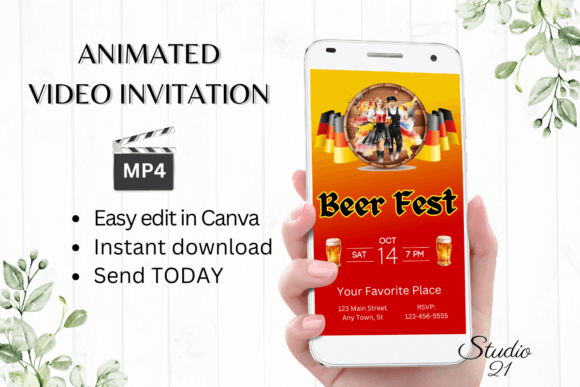
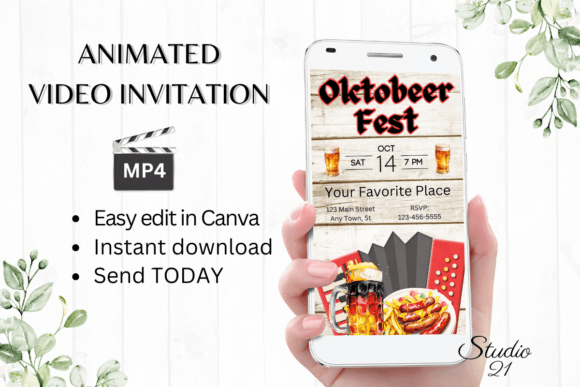
Planning a celebration shouldn't feel like a second job. Yet, the traditional approach to party invitations—designing, printing, stuffing envelopes, and mailing—often consumes time and energy that could be better spent on the event itself. This is especially true for a themed gathering like an Oktoberfest party, where the excitement is all about the festive atmosphere, not the logistics. Enter the modern solution: a Digital Oktoberfest Invitation. This isn't just a digital file; it's a dynamic, animated video template that you can download, personalize, and send in minutes, completely transforming how you approach event communication.
Beyond Static Paper: The Appeal of Animated Invites
A digital animated invitation does more than convey information; it sets a mood. Imagine your guests receiving a link that opens to a lively video featuring falling pretzels, clinking beer steins, and festive German-inspired typography. This immediate visual storytelling creates excitement and gives a tangible preview of the party's vibe. For small business owners hosting a customer appreciation event or content creators throwing a community meetup, this approach demonstrates a level of creativity and technical savvy that resonates with a modern audience. It’s a piece of brand identity in motion, showing you value both aesthetics and your guests' time.
The practical benefits are significant. With a template designed in a platform like Canva, you bypass the software learning curve. There's no need to download special fonts or applications. The editing happens directly in your browser or on the Canva mobile app, making it accessible whether you're at your desk or on the go. This democratization of design tools means you don't need to be a professional graphic designer to produce a professional presentation. The template provides the structure and visual consistency, and you provide the personalized details.
Practical Applications for Brands and Creators
While the primary use is for personal parties, the applications for entrepreneurs and marketers are surprisingly broad. Consider these scenarios where a polished digital invite shines:
- Brand-Building Events: A brewery launching a new seasonal lager could use this as a stylish save-the-date for its taproom event, reinforcing its brand recognition through consistent, festive visuals.
- Social Media Engagement: A food blogger hosting a virtual Oktoberfest cooking class can share the animated invite as a social media graphic (as an MP4) to drive registrations, standing out in a crowded feed far better than a static image.
- Community Management: For online communities or membership sites, a digital invite is an efficient way to announce a live stream or a special members-only gathering, fostering a sense of exclusive belonging.
- Internal Company Culture: HR departments or team leads can use a fun, themed digital invite to boost morale and audience engagement for a company fall festival, making the internal communication feel less corporate and more celebratory.
The key takeaway is that the medium itself becomes part of the message. Sending a high-quality, animated video invitation signals that you're thoughtful, detail-oriented, and in tune with contemporary communication methods. It’s an investment in the professional presentation of your event, no matter the scale.
Mastering Your Message: Editing and Personalization
The true power of a template lies in its flexibility. Once you access the link in Canva, you gain control over every element. This is where you move from a generic template to a personalized piece of marketing asset.
Text and Typography: The foundation of any invitation is its wording. The template likely uses a combination of display font styles for headlines—perhaps a bold, celebratory serif or a playful script font—and a clean sans serif font for the essential details like date, time, and location. You can easily change the font style, color, and size to match your specific aesthetic. If the template uses a handwritten font for a casual touch, you can swap it for a more formal serif font if your event's tone is different. The goal is readability first; ensure the critical information is effortless to read, even on a small mobile screen.
Visual and Animation Tweaks: Canva allows you to change animation styles, which affects how text and graphics appear on screen. You can also add or delete text elements. This means you can include a dress code, a note about bringing a side dish, or a link to a playlist. You're not just filling in blanks; you're tailoring the design assets to communicate your exact vision. This level of customization is crucial for maintaining visual consistency with any other branding you might have, like a logo or specific color palette.
Distribution Done Right: Sharing Your Creation
After you've perfected your design, the final step is distribution. The template's instructions will guide you to download your personalized creation as an MP4 file. This file format is universally compatible, meaning you can share it via text message, WhatsApp, Messenger, iMessage, or email with zero compatibility issues for your recipients. For a more formal approach, especially in a business context, you can also generate a shareable link from Canva, which can be embedded in an email newsletter or a calendar invite.
This method eliminates the uncertainty of postal delivery and the clutter of physical mail. You get instant confirmation when your guests receive the message. Furthermore, the digital format allows for last-minute updates. If you need to add a weather contingency note or adjust the time, you can quickly edit the Canva template, re-download the MP4, and send an update. This agility is something a printed invitation could never offer.
Choosing the Right Template for Your Vibe
When selecting your Digital Oktoberfest Invitation template, think about the overall feel you want to create. Does your party lean more toward a rustic, traditional beer hall aesthetic, or is it a modern, casual backyard gathering? Look for templates whose design style—color scheme, illustration style, and typography—aligns with that vision. A template with a classic premium font and muted colors might suit an elegant dinner party, while one with bold colors and a playful typeface would be perfect for a family-friendly event.
Remember to consider the practical details. The template's layout should make it easy to include all necessary information without looking cluttered. A good font pairing (like a strong headline font with a simple body font) will naturally guide the eye to the most important details. Test the animation style in Canva's preview mode to ensure it feels energetic but not overwhelming. The goal is to enhance your message, not distract from it.
In the end, a digital animated invitation is more than a convenience; it's a strategic communication tool. It saves time, reduces stress, and elevates the perceived value of your event. By leveraging editable templates, you harness the power of modern typography and motion graphics to make a memorable first impression, long before the first guest arrives. It’s a practical, stylish, and intelligent way to celebrate, connect, and communicate in a digital-first world.