Magnum: A Clean, Powerful Template for Business Presentations
We've all been there. It's late, the coffee is cold, and you're staring at a blank PowerPoint slide. The cursor blinks, mocking your creative block. Whether you're preparing a pitch for investors, outlining a new marketing strategy, or designing a workshop for your team, the presentation itself often feels like a mountain to climb before you even get to the content. You know a polished deck is non-negotiable—it builds credibility and keeps your audience engaged—but who has the time or design budget to start from scratch every single time? This is where a thoughtfully crafted template becomes less of a luxury and more of a strategic tool for any busy professional.
Beyond the Default: What Makes a Template Truly Useful?
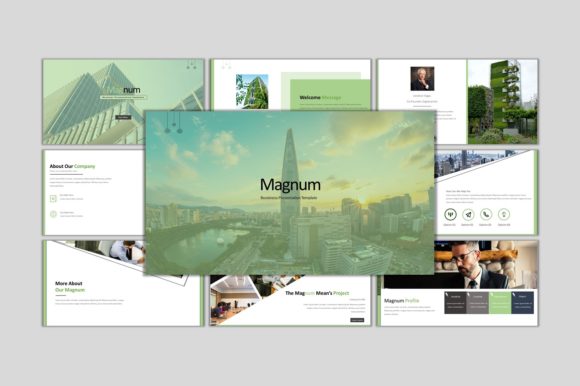
A good presentation template does more than just offer a few pretty slide layouts. It acts as a foundational design system for your ideas. The Magnum - Business PowerPoint Template is built with this principle in mind. It’s not just a collection of slides; it’s a cohesive visual framework designed for clarity and impact. The core appeal lies in its clean, modern aesthetic—think strong typography, balanced layouts, and a professional color palette that can be easily adapted to any brand. This isn't about flashy animations or distracting graphics. It's about providing a structured canvas that lets your message take center stage, which is precisely what you need when communicating complex business concepts.
The real-world value is in the details. All 30 slides are built on Master Slides, which means you can change a font, color, or logo once and have it update across your entire deck instantly. This is a massive time-saver and ensures visual consistency, a key component of strong brand identity. The graphics are fully resizable and editable directly within PowerPoint, so you're never stuck with an element that doesn't fit your layout. For anyone who has wrestled with trying to edit a locked graphic in another template, this level of control is a game-changer.
From Boardroom to Brainstorm: Practical Applications for Every Creator
The versatility of a well-designed PowerPoint template like Magnum is where it truly shines. Its multipurpose nature means it can seamlessly transition across different projects and industries, becoming a reliable part of your design assets toolkit. Consider how a unified visual language elevates communication across different mediums:
- For Entrepreneurs and Small Business Owners: Use it to craft investor pitches, client proposals, and quarterly business reviews. The professional structure helps build trust and present your data with authority. It’s also perfect for creating internal training materials or team meeting agendas that look polished and organized.
- For Marketers and Content Creators: Develop compelling campaign decks, social media content calendars, or webinar presentations. The clean layouts are ideal for showcasing marketing metrics, campaign results, and strategic plans. You can even repurpose slide designs as standalone social media graphics for platforms like LinkedIn or Instagram.
- For Educators and Consultants: Build engaging workshop materials, course outlines, or client-facing reports. The template’s focus on readability ensures your audience can follow along easily, whether in a live session or reviewing the deck later. The Montserrat and Poppins font pairing is modern and highly legible, even from a distance.
Think about the last time you needed to create a quick poster for an event or a one-page marketing asset for a product launch. Instead of opening a separate design program, you can use a slide from the Magnum template as a starting point. The picture placeholder feature is particularly helpful here—simply drag and drop your own images into the designated areas, and the layout adjusts intelligently. This functionality bridges the gap between a presentation tool and a quick-and-dirty graphic design solution for non-designers.
Mastering the Details: Typography, Icons, and Your Brand
The included Montserrat and Poppins fonts are no accident. These are sans serif fonts celebrated in modern typography for their geometric clarity and friendly professionalism. Montserrat offers a slightly more distinctive, stylish character, while Poppins provides exceptional readability with its rounded, open forms. Together, they create a harmonious and contemporary font pairing that works across headings and body text. Because they are free web fonts, you can also use them on your website or in other digital materials, ensuring your branding remains consistent from slide deck to homepage.
Another powerful feature is the inclusion of over 2000 icons in a separate Icon.pptx file. Icons are fantastic visual shorthand. They can break up text-heavy slides, illustrate abstract concepts, and guide the viewer’s eye. Need an icon for "growth," "teamwork," or "digital strategy"? It’s likely already in the library. This saves you from hunting for and purchasing icon sets separately, making the Magnum template a more complete design asset package. Remember, when using icons, consistency is key—stick to one style (line, filled, etc.) throughout your presentation for a cohesive look.
A Practical Workflow: From Blank Slide to Polished Deck
So, how do you actually put this into practice without getting overwhelmed? The process is more straightforward than you might think. Start by choosing a color scheme that aligns with your brand or the mood of your presentation. The template’s colors are easily editable, so you can swap them out in minutes using the Master Slides. Next, select your slide layouts. Don’t feel pressured to use all 30; pick the ones that best serve the content you have. Is it a data-heavy slide? Choose a layout with a chart placeholder. Is it a key takeaway? A bold text-focused slide might work best.
Then, focus on your content. Write your key points first, then place them into the slides. The template’s structure will naturally help you organize your thoughts. Use the picture placeholders to add relevant images, team photos, or product shots. Finally, review for readability. Check your text size, contrast against the background, and spacing. The goal is a clean, uncluttered slide where the main idea is immediately apparent. This practical, step-by-step approach turns the daunting task of presentation design into a manageable, even enjoyable, process. It’s about using the tool to enhance your thinking, not complicate it.
In the end, the Magnum template is about removing friction. It handles the heavy lifting of design and layout so you can focus on what you do best: crafting a compelling story with your data, ideas, and expertise. Whether you’re closing a deal, educating an audience, or launching a new initiative, starting with a solid, adaptable foundation makes all the difference. It’s not about having a fancy presentation; it’s about having a clear, professional, and effective one. And that’s something any professional, from a small business owner to a content creator, can appreciate.