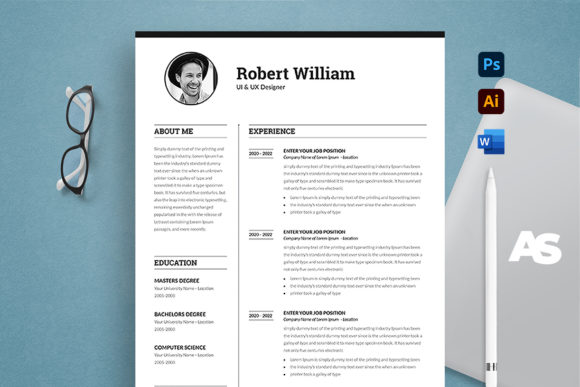
Land the Interview: The Anatomy of a Standout Resume Template
Let’s be honest: job hunting is exhausting. You spend hours scrolling through listings, tailoring cover letters, and tweaking your resume until your eyes cross. But here is the reality check that many candidates miss—in a competitive market, your experience is only half the battle. The other half is presentation. Recruiters often spend less than ten seconds scanning a document before deciding to keep it or toss it. That fleeting window means your resume cannot just be good; it has to be visually distinct and impeccably organized. Enter this Professional Resume/CV Template. It isn’t just a layout; it is a strategic tool designed to bridge the gap between your skills and the hiring manager’s attention.
Why Design Matters in Corporate Communication
We live in a visual world. As designers, marketers, and entrepreneurs, we understand that branding applies to people just as much as it applies to companies. When you apply for a job, you are the brand, and your resume is your packaging. If the packaging looks generic, the product inside is often overlooked. This template is built on that exact premise. It moves away from the boring, blocky text documents of the 1990s and embraces modern typography and clean grid structures.
The visual appeal of this template lies in its balance. It uses negative space effectively to prevent the "wall of text" effect that intimidates readers. By utilizing a professional layout that guides the eye naturally from your header to your experience, it ensures that your most important assets are front and center. It communicates competence before the recruiter even reads a single bullet point.
Beyond the Resume: Versatility for Your Personal Brand
While the primary goal is landing a job, a high-quality template like this offers versatility for various aspects of your professional life. If you are a freelancer or a small business owner, the structure of this Professional Resume/CV Template can easily be repurposed.
Think about it:
- Consultant Proposals: Use the layout to present your credentials and case studies to potential clients.
- Portfolio Summaries: Create a condensed, printable version of your portfolio to leave behind after networking events.
- Speaker Bios: If you are a content creator or public speaker, use the design to create a polished bio sheet for event organizers.
The files are delivered in Adobe Photoshop (.psd) and Microsoft Word (.docx), ensuring that whether you are a graphic designer comfortable with layers or a business owner who prefers drag-and-drop simplicity, you have total control. This flexibility is crucial for maintaining brand identity across all your professional touchpoints.
Technical Precision: The Details That Get You Hired
Have you ever printed a document only to find your text cut off at the edges, or the colors looking dull compared to your screen? This is where technical specs matter. This template is set up with bleed settings (0.25 inch) and 300 DPI, CMYK color. In plain English, this means it is print-ready. You won’t have to guess if the margins are correct or if the resolution is high enough for a crisp, professional look.
Furthermore, the template is optimized for A4 paper size, which is the international standard for business documents. This attention to detail signals to an employer that you understand professional standards. It shows you care about the small things—which, in many industries, is exactly what hiring managers are looking for.
Customization: Making It Truly Yours
A template is only useful if it can adapt to your specific needs. This is where the "Super Easy to Edit" feature becomes a game-changer. All objects, colors, and text are fully editable. You aren't locked into a specific color scheme. If you are applying for a creative role at a startup, you might use bold, vibrant colors. If you are targeting a corporate law firm, you can instantly switch to classic navy and charcoal.
The inclusion of Illustrator (.ai) files is a massive bonus for those who work with vectors. It allows for infinite scalability and precision editing that raster-based programs sometimes struggle with. Plus, the use of only free fonts means you won't have to pay extra licensing fees just to open the file. You get the premium look without the recurring costs.
Practical Advice for Final Polish
Once you have downloaded the files and customized the text, don't just hit "Print" immediately. Here are a few practical tips to ensure your resume makes the maximum impact:
- Test Your Pairings: The template likely uses a font pairing of a sans serif font for headers and a serif font for body text (or vice versa). Ensure the hierarchy is clear. The name should be the loudest thing on the page; your job title should be the second loudest.
- Check Readability: Print a test page. Hold it at arm's length. Can you still read the company names and dates? If not, bump up the font size slightly.
- PDF is King: While the template comes in Word and PSD, always save your final submission as a PDF. This locks in your formatting so it looks the same on the recruiter's Mac as it does on your PC.
- Review the Instructions: The package includes a detailed instructions file. Read it. It often contains specific advice on how to handle the layers in Photoshop or how to install the fonts correctly before opening the Word file.
Ultimately, a Professional Resume/CV Template is about removing friction from the application process. It removes the guesswork of layout design so you can focus on what matters most: articulating your value. Whether you are a graphic designer, a marketer, or a hobbyist looking to go pro, presenting yourself with this level of polish is the first step toward your next big opportunity.